


Nerd House
Variety Gamer


Tons of people have asked what Steam Keys are, and I have replied numerous times, but the same people keep asking what they are, so I figured a thread was in order.
PSA = PUBLIC SERVICE ANNOUNCEMENT
ANYWAY.
A Steam key is a string of characters that, when redeemed in the Steam Client, activates a game on your Steam account. That game is now permanently added to your Steam Library, for you to play as you wish.
Your typical Steam Key will look something like this:
QBNVA-JZQKM-M83N7
To redeem a Steam Key, you must first have the Steam Client installed. You may find it here.
Once you have the Steam Client downloaded and installed, you must log into your Steam Account. If you do not have an account, you may create one here. Please note a Steam account is 100% free, and there are no referral links or anything of that sort associated with Steam, so please do not freak out about these links.
When you are logged in, you will be taken to your home page in the Steam Client, which is typically your Game Library, which will look something like this:

This is a screenshot of my currently installed games on my own account.
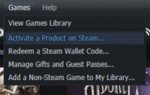
To redeem a Steam Key, look at the top left menu options, and select "Games".
Then select "Activate a Product on Steam".
A window will pop up, just click Next, then I Agree, and you'll be presented with a screen like this, where you enter your key:
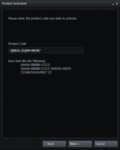
Click Next after you enter your key, and assuming the key is unused, the product associated with it will be permanently added to your Steam account.
PSA = PUBLIC SERVICE ANNOUNCEMENT
ANYWAY.
A Steam key is a string of characters that, when redeemed in the Steam Client, activates a game on your Steam account. That game is now permanently added to your Steam Library, for you to play as you wish.
Your typical Steam Key will look something like this:
QBNVA-JZQKM-M83N7
To redeem a Steam Key, you must first have the Steam Client installed. You may find it here.
Once you have the Steam Client downloaded and installed, you must log into your Steam Account. If you do not have an account, you may create one here. Please note a Steam account is 100% free, and there are no referral links or anything of that sort associated with Steam, so please do not freak out about these links.
When you are logged in, you will be taken to your home page in the Steam Client, which is typically your Game Library, which will look something like this:
This is a screenshot of my currently installed games on my own account.
To redeem a Steam Key, look at the top left menu options, and select "Games".
Then select "Activate a Product on Steam".
A window will pop up, just click Next, then I Agree, and you'll be presented with a screen like this, where you enter your key:
Click Next after you enter your key, and assuming the key is unused, the product associated with it will be permanently added to your Steam account.


