You can save up to 72 designs!

biibii

pudding dog.
Joined
Mar 25, 2014
Posts
5,173
Bells
334
Eggs
0
Switch
0713-6060-7729
Rainbow Star Fragment
Pink Sakura
Dreamy Easter Egg
Pink Sakura
Flower Glow Wand
Ice Cream Swirl
Popsicle
Ice Cream Swirl
Popsicle
Ice Cream Swirl
Tired of having those stupid paths taking up all of your design space?
I know how you can save them in a diffrent way and still have them shown on the ground, Hack-free!
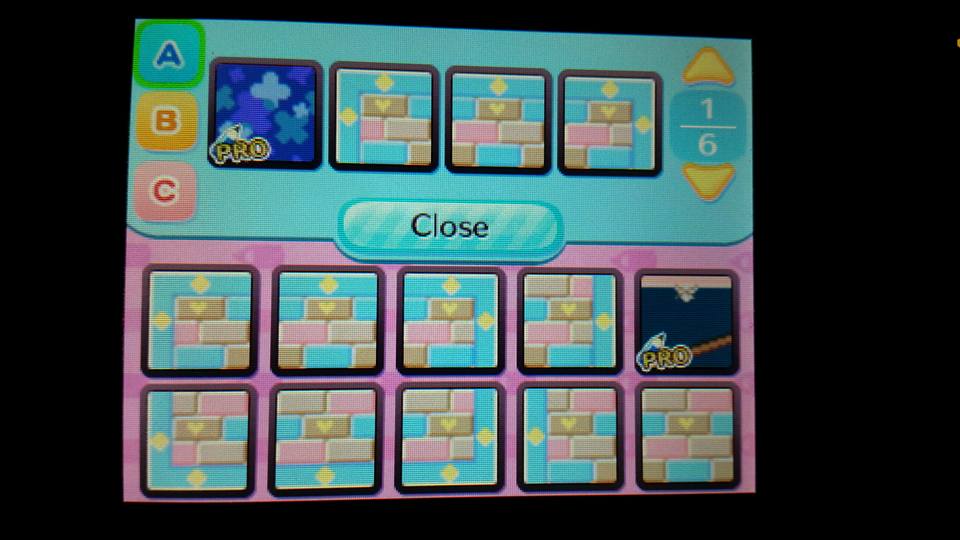
All you have to do is talk to Mabel and choose "save a design" and you can save up to 72 designs!
Now you can have all of the paths and clothing you want !!
<333
photo proof:
attachment.php
 

Attachments

  • 11892194_868715986515224_472492726686496076_n.jpg
    11892194_868715986515224_472492726686496076_n.jpg
    56.4 KB · Views: 171
If only refurbished furniture and paths didn't change along with the ones you swapped in for.
 
Unfortunately only the ones that are you carrying will show up. The only other way to make more paths show up on the ground would be make more characters to hold more patterns. That's mainly why people have mule characters that only have tents as homes. They're mainly used for carrying patterns or just more space for items.

I tried doing this when I first found out that you can save the qr codes but it didn't work obviously. I refurbished a suitcase recently too with a Phoenix wright design and when I accidentally saved a dress qr over it, I had to resave the PW design back over the same slot in order to make it appear on the suitcase again. Even with paths I had to save the correct right edge to right edge of a different qr path in order for them to appear on the ground correctly. Saving the designs with Mable is just a way for you to have access to the design later, but it's not meant to be a slot for more things to show up in your town sadly.

However, for you town flag, it will stay the same even if you delete that one design from your slot so I guess one free space? Lol
 
Unfortunately only the ones that are you carrying will show up. The only other way to make more paths show up on the ground would be make more characters to hold more patterns. That's mainly why people have mule characters that only have tents as homes. They're mainly used for carrying patterns or just more space for items.

I tried doing this when I first found out that you can save the qr codes but it didn't work obviously. I refurbished a suitcase recently too with a Phoenix wright design and when I accidentally saved a dress qr over it, I had to resave the PW design back over the same slot in order to make it appear on the suitcase again. Even with paths I had to save the correct right edge to right edge of a different qr path in order for them to appear on the ground correctly. Saving the designs with Mable is just a way for you to have access to the design later, but it's not meant to be a slot for more things to show up in your town sadly.

However, for you town flag, it will stay the same even if you delete that one design from your slot so I guess one free space? Lol

This post basically. P:

town flags, face cut-out standee, and custom-design sign all stay the same even if you delete the design though. c:
 
Back
Top