Game won't match TV resolution

RhinoK

Back for NH!
Joined
Sep 9, 2013
Posts
3,296
Bells
393
Countdown Coins
0
Lucky Tickets
0
Winter Mittens
October Birthstone (Opal)
Orange Mote of Flame
August Birthstone (Peridot)
Waluigi Easter Egg
Astral Inner Planet Floating Gold #10
Cake
Gold Mailbox
Small Mailbox
I've googled this and nothing has come up.
It's hard to explain but I just got a new XBOX 360 yesterday and I'm trying to play Lightning Returns (oh boo) and I don't know if it's only this game or other games (which I don't have with me atm) but it doesn't fit my TV screen, yet the XBOX menu does.
My TV resolution is 32" and there is nothing in the games settings that changed this, anyone know why?
 
What's the actual resolution of your TV? 720p? 1080p? 32" is a measurement, it doesn't tell what the resolution is.
What kind of cable are you using to connect the 360 to your TV?
 
What's the actual resolution of your TV? 720p? 1080p? 32" is a measurement, it doesn't tell what the resolution is.
What kind of cable are you using to connect the 360 to your TV?

720p and it's actually 27", typo.

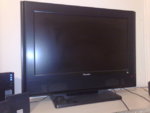
I found a picture of it, it's this one:
28102009532.jpg

- - - Post Merge - - -

Oh and a HDMI cable
 
Did you check the Xbox 360 settings? It might be that it's set to an SD resolution at the moment, but I'm not sure if that would happen with an HDMI cable. I'll look for other possible causes in the meantime.
 
Some games don't have a high enough resolution to match your tv's resolution. The bigger the screen, the lower the resolution will be. Is like me playing WW on my 3ds, the resolution will be terrible.
 
Some games don't have a high enough resolution to match your tv's resolution. The bigger the screen, the lower the resolution will be. Is like me playing WW on my 3ds, the resolution will be terrible.
Wild World is emulated through 3DS software to be locked at the DS's aspect ratio but still be upscaled to the proper resolution for 3DS/XL/2DS. There's some obvious pixelation when that happens, because the graphics that were meant to be displayed on a specific screen are now being displayed on a bigger one. The same happens with PSP games played on the Vita (particularly noticeable in Loco Roco, where the smooth graphics are suddenly jaggy).
The problem RhinoK has is unrelated to that. Something between his system and TV is not communicating correctly, leading to the image not being output correctly. If that wasn't the case, the 360 should upscale it to the correct size.

The only big problem I could find that could cause letterboxing (or any black bars) is that your TV doesn't match the two most popular standard sizes - 4:3 and 16:9. A 16:10 aspect ratio for example will get letterboxing because the 360 will output a 16:9 image, leading to letterboxing. If that is the case the solution is sadly "deal with it".
The TV is listed as HD ready but it doesn't mention the aspect ratio or native resolution. I've been looking around and have been able to find the page where it was being sold (where you found the image), but it's not mentioned there either.

To break it down, the problem is either that your aspect ratio is off or that you 360's resolution setting is off somehow. The menu displays properly though, so I'm not sure if the latter is where it's at. I'd still try changing the resolution to 1366x768 or something to see if the game unpoops itself.

Would it be possible for you to take pictures of your Xbox menu and the game while they are displaying? It would give us a better idea of what's happening.
 
Pics.... I didn't think of that.

To be fair it's been over half a year since I played the game but I don't remember it being like this... otherwise I would've complained earlier hehe.
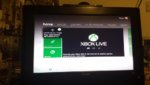
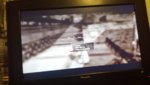
10743443_1535814079991879_1861010509_n.jpg10751570_1535814076658546_183155450_n.jpg

The black border at the top and bottom... That's what I'm trying to explain.
 
The circles on the menus seem kinda squished. Is your 360 set to widescreen in the display settings?

The letterboxing seems too large for a 16:9/16:10 difference, which can be seen in this image. That means the problem lies somewhere within the settings on the system or TV, but since the Dashboard displays properly I don't think it's the latter.
 
The circles on the menus seem kinda squished. Is your 360 set to widescreen in the display settings?

The letterboxing seems too large for a 16:9/16:10 difference, which can be seen in this image. That means the problem lies somewhere within the settings on the system or TV, but since the Dashboard displays properly I don't think it's the latter.

It's 16:9. The only other ratios are 4:3 and 16:9. There's no settings for the system or the game to change display... but as you said, the dashboard is perfectly fine. I'm not sure what's wrong.
 
It's 16:9. The only other ratios are 4:3 and 16:9. There's no settings for the system or the game to change display... but as you said, the dashboard is perfectly fine. I'm not sure what's wrong.
So far I've just been able to find people with the same problem and no real solutions. One guy did say turning on VSync in the game settings fixed it for him, but I'm not sure if Lightning Returns has many settings available to you. Not many console games do. I'll keep looking around in the meantime.
 
Actual gameplay screenshot looks fine to me. My 60' HDTV displays the game the same way.
 
Actual gameplay screenshot looks fine to me. My 60' HDTV displays the game the same way.
That's strange, though. All the footage I've been able to find of the game shows it without the letterboxing, so I'm not sure if it's supposed to be doing that. Doesn't it appear squished compared to other games?
 
Actual gameplay screenshot looks fine to me. My 60' HDTV displays the game the same way.

It does? I'm certain when I played it last it didn't letterbox... hmmm

- - - Post Merge - - -

So far I've just been able to find people with the same problem and no real solutions. One guy did say turning on VSync in the game settings fixed it for him, but I'm not sure if Lightning Returns has many settings available to you. Not many console games do. I'll keep looking around in the meantime.

I couldn't find any solutions either. Thank you for going through this trouble to help, deeply appreciated.
 
Back
Top