
-
 Easter season is here! Here's what we have going on at The Bell Tree:
- The egg decorating contest is back! Join TBT’s Fifth Egg Decorating Contest, now with two distinct categories: decorating and painting. Entries must be submitted by April 9th.
- Starting this Friday at 7PM EDT, follow clues to search for eggs around the forum in TBT's Thirteenth Annual Easter Egg Hunt. New eggs will appear throughout the weekend and the hunt ends on April 6th!
- Customize your profile by spending bells on any of our three recurring backdrops.
You are using an out of date browser. It may not display this or other websites correctly.
You should upgrade or use an alternative browser.
You should upgrade or use an alternative browser.
confused with pixels
- Thread starter biibii
- Start date


Some resources you could check out:
http://pyrogoth.deviantart.com/art/50x50-pixel-doll-step-by-step-324216932
http://pyrogoth.deviantart.com/art/Pixel-tutorial-coloring-lineart-and-shading-352865860
http://mimru.deviantart.com/gallery/40324454/Step-by-step
hope this helps!!
.:Evvie's Magnificent 200x200 Chibi Pixel Guide!:.
In this tutorial, I will be showing you how to make a 200x200 Pixel Chibi on Sai, or any program that supports transparency and layers!
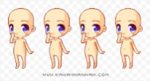
STEP 1: Firstly, open a 200x200 canvas and import this image:
 Simple, right? On to step 2!
STEP 2: Outline your Chibi, and (optional) color the lines!
Outlining means you give the lines for you to color! I like to change the color of my lines before I color, but it is personal preference!


Raw outline, use red rather then black because if you use black, its hard to see your uncolored lineart!
Got it?
STEP 3: Hide the base, and add the block colors!
This is a pretty simple step! Just like a child, you fill in the lines! Make sure to outline the insides first!

 Woo, big part is over!
STEP 4: Shading!
This time you select two darker shades of each color, and shade! Just know where the dark and light patches will be~
 Aaaaand, your done! Enjoy your little chibi!
These chibis fit TBT avatar size, so you can use yours if you want!
Please do not steal my actual chibi!
Base is a scaled down Snow Miku template!
Please do not use my base if you are planning to sell or giveaway chibis made from it!
In this tutorial, I will be showing you how to make a 200x200 Pixel Chibi on Sai, or any program that supports transparency and layers!
STEP 1: Firstly, open a 200x200 canvas and import this image:
STEP 2: Outline your Chibi, and (optional) color the lines!
Outlining means you give the lines for you to color! I like to change the color of my lines before I color, but it is personal preference!
Raw outline, use red rather then black because if you use black, its hard to see your uncolored lineart!
STEP 3: Hide the base, and add the block colors!
This is a pretty simple step! Just like a child, you fill in the lines! Make sure to outline the insides first!
STEP 4: Shading!
This time you select two darker shades of each color, and shade! Just know where the dark and light patches will be~
These chibis fit TBT avatar size, so you can use yours if you want!
Please do not steal my actual chibi!
Base is a scaled down Snow Miku template!
Please do not use my base if you are planning to sell or giveaway chibis made from it!
Last edited:

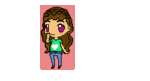


would look nicer if it didnt have black outlines/lineart and shading that makes more sense. i can edit ur img to show you if youd like.
also you dont make things smaller just by resizing it, it loses a lot of detail and stuff. actually make a smaller version.
also you dont make things smaller just by resizing it, it loses a lot of detail and stuff. actually make a smaller version.
would look nicer if it didnt have black outlines/lineart and shading that makes more sense. i can edit ur img to show you if youd like.
also you dont make things smaller just by resizing it, it loses a lot of detail and stuff. actually make a smaller version.
sure! the shading is gross ew.
Similar threads


- Replies
- 12
- Views
- 1K


- Replies
- 8
- Views
- 380