Ugh I know this is gonna come across as rude, but ever heard of maybe figuring out somethings by yourself? I mean cmon... Just go to your profile and click on "wi-fi rating"
Click "My Profile" at the top of the page. Once it loads, look at the list of tabs. Wi-fi Feedback is the final one on the row. Then from there "View Complete Feedbacks".
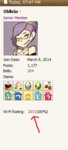
You can also go to any forum where your Wi-Fi feedback is visible by default, such as the VTP or Re-Tail and look at a post you've made. Your rating will be shown as seen below, and you can click on the number to view your feedback: