• The results of the egg decorating contest have been announced! Everyone's designs were amazing! Congratulations to our winners!

Tumblr Issue.

PugLovex

taylor swift enthusiast
Joined
Mar 17, 2018
Posts
1,360
Bells
753
Eggs
0
Switch
3994-2737-3875
The Bell Tree World Championship 2021 Patch
So I recently downloaded a new theme, (it let me save it don't worry it isn't that other issue.) and I put my page links on my extra link (So my page link and my extra link are the exact same things), I save and exit editing, but when I go on to my blog from google/safari, and hit my extra links/other pages, they say "Not Found, the URL you requested could not be found."

Can anyone help me with this? Thanks!
 
I had this issue a few days ago so I may be able to help. It's been doing this with all custom themes lately.

1. Go to Settings
2. Press Edit HTML
3. Press Control F (or Command F)
4. Put in Search For section: http://
5. Put in Replace With: https:// (Make sure to replace all)

And voila, that should do the trick!

Let me know if that worked for ya. :)
 
are you referring to the glitch where non-https urls don't work with custom themes? if so, I already fixed that glitch :)

im referring to when I make a page and I have the url (for example, bunillie.tumblr.com/aberdale) and when I put the same url into my extra link pages (so extra link 1 has the same link, which is bunillie.tumblr.com/aberdale), and when I save it, I go onto the blog, and when I go to the extra link 1, it says Not found, the requested url cannot be found :P
 
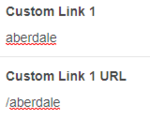
i think i might know your problem! when you're putting the link in are you putting in "bunillie.tumblr.com/aberdale" or just "/aberdale"? it should be just /aberdale!
 
do you mean when I go onto the page? because I already have just /aberdale :)

I don't know what the issue is, I can try it though!
 
Last edited:
sorry i wasn't very clear xP, i meant in the extra link box! like this:
ex1.png
 
oh ok! I'll try :)

edit: it worked! thanks! it would always make me put in the exact url before. thank you :)
 
Last edited:
Back
Top