Help with plotting 10th villager?

retaail

Junior Member
Joined
Aug 7, 2017
Posts
3
Bells
75
Lucky Coins
0
Gems
0
Hi, I'm sorry that this is my first post here but I'm currently dealing with an issue of my 10th villager moving in on top of paths. I have covered everywhere I want there to be paths, and I had a spot open for Julian to move in. There was plenty of space around it and it was sandwiched between the edge of the plaza and a cliff, so I wasn't sure if it would work or not. I have been using the reset method to see if he is putting his house where I want it to be. However, no matter where I open up space for him to move he still insists on moving on top of paths. The other two plots I tried clearing for him are completely away from any PWPs and cliffs and yet he still keeps doing this. I know he needs a 3x3 space, with extra space on all sides I've been giving him 2 spaces all around on all sides on top of that. And yet he stubbornly places his house right in the middle of paths, even on areas that have less room than what I've given him! I've had other villagers move in just fine when I had paths down everywhere, and they always ended up where I wanted them.

Am I doing something wrong here, or do paths just not have any effect on the 10th villager?
 
if your villager keeps moving onto paths, it means that the spots you left open for them are not valid spots. something i recommend for you is to check your acres! :blush:

here's an overview of acres:
villagers can't move into the same acre (16 x 16 units) as the train station or the plaza stone... i would recommend you try counting across your map grid to see if the spots you picked for your villager are too close. so each villager's house is a 3 x 3, right? like:

x x x
x x x
x x x

^^^, but the middle, red, x is the one that matters when you're checking if it's in the same acre as the plaza stone or train station. as long as that x isn't in the same acre, your villager shouuuld be able to plot there!

(also, you can only have up to three buildings on an acre as well. that includes stuff like character houses, villager houses, police station, campsite, town hall, retail, etc. etc.))

from your description, it looks like you're trying to put them too close to the plaza stone! i recommend using 3ds settings to tt back a day (make sure to use 3ds settings! if you change the time with isabelle, it will count as moving a day forward, and your villager will just plot wherever), and move around some designs to give your villager a valid place to plot.

hope that helped some!! good luck with resetting ;;;
 
if your villager keeps moving onto paths, it means that the spots you left open for them are not valid spots. something i recommend for you .....

Hi, I haven't just been trying to plot him there though. On the other side of town, he is near the police station, which is in front of the Retail. the ramp to the beach is near there too, but I'm not sure why he won't go in the spot I want him to because in the past I have had other villagers put their houses there, and even then I'm giving him more space than the others had. There is no other place where he can fit that would be a good spot, and the only places left to put him would be behind the town hall. And there's already two villagers in that area! I could post images straight from here to show you what I mean in a second
 
I've had the same issue. I reccomend just resetting until he is in a spot that is somewhat acceptable, its tedious but worth it in the end
 
Last edited:
I feel so awful when I read about these issues because I know that they can be easily fixed through hacking. My sincere respect to anyone dealing with plotting villagers in-game - I really hope they make it easier for people in the future :3
 
20170807_152535-1.jpg
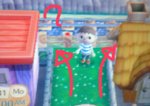
The original spot (didn't work)

2017-08-07 15.36.17.jpg

So then I tried this, possibly too close to PWP? "B" stands for beach I couldn't write the full word on mobile and still have it be legible lol

20170807_152652-1.jpg
Then I did this... which is just behind the second one. Also didn't work, farther from the beach and I gave it room from everything around it

2017-08-07 15.35.24.jpg

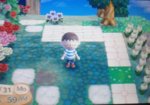
This is the one that just confuses me. Extra space on all sides, no beach, far from PWP and cliff and police station. I chopped down my precious pine trees and still nothing. "C" here means cliff

Here are two of my other residents on the other side of the tracks, only one space between them and the tracks.

2017-08-07 15.33.45.jpg

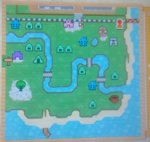
For reference, here is my town map. I am standing in the middle of the last plot I tried, and as you can see, there are no residents or anything around... I'm just so confused by this...

20170807_153159-1.jpg

(mobile messed up oooops xD)
 

Attachments

  • 20170807_152625-1.jpg
    20170807_152625-1.jpg
    97.7 KB · Views: 27
Last edited:
The first, third, and fourth plots are too close to other things. I don't see why he won't plot in the second one.

I recommend this simple guide for how close you can actually place structures to one another.
 
Back
Top