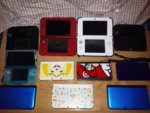
Don't forget that the clocks are now 1 hour ahead for those who observe Daylight Saving Time. There are 2 ways to do this, you can change the system clock, which is fine if you only have one system, but if you're like me and tend to have something like a dozen of them (see picture), then there's also the option of changing the clock at the start of the game under the "I need help first" then "Set the date/time", so you won't have to change every single clock on your system as the game will be an hour ahead of every configured system clock (as long as all your system clocks are the same time).